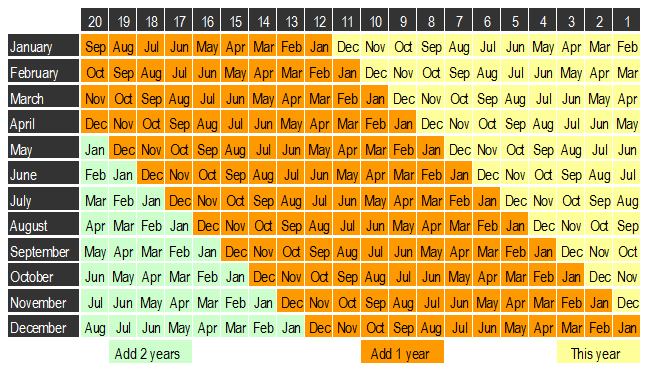
Revolving credit payment calculation table
The months listed down the left hand side of the table represent the starting point to find the expiry dates 1 and 2.
The numbers along the top of the table are numbers of months.
To find expiry date 1 (20 months from purchase date)
Find the month of the purchase date in the left hand column. Then go to the column 20. The point where these two columns meet is the month of the expiry date. Add the years indicated at the bottom of that shaded section to the year of the purchase date. This is expiry date 1.
Example
Purchase date is 15 January 2022. Select January in the left hand column and column 20 - the month is September. Add 1 year to 2022 to get the year of expiry. Expiry date 1, is 15 September 2023.
To find expiry date 2 (number of months from application date)
Find the month of the application date in the left hand column. Then go to the appropriate number of month's column (this is the number of months from step 3 of the formula). The point where these 2 columns meet is the month of the expiry date. Add the years indicated at the bottom of that shaded section to the year of the application date. This is expiry date 2.
Example
Application date is 24 March 2022 and the number of months from step 3 is 15. Select March in the left hand column and column 15 - the month is June. Add 1 year to get the year of expiry. Expiry date 2 is 24 June 2023.
Expiry date calculation monthly table
Use this table to help you determine the expiry dates when calculating credit card payments to use in the assessment of Temporary Additional Support. (This is also available in a format that provides a better print quality .)